
Soda Core: The Simplest Open Source Data Reliability Tool
Data reliability is critical for the success of organizations in today’s data-driven business environment. It is essential for making…


Data reliability is critical for the success of organizations in today’s data-driven business environment. It is essential for making informed decisions, operating efficiently, complying with regulations, satisfying customers, and gaining a competitive advantage.
Enabling data reliability solutions through the whole data pipeline builds trust in the organization and eliminates the main obstacles around scalability.
Today I am going to introduce an open-source data reliability tool that serves most likely the simplest solution in the market that any data team can integrate into their pipelines and take advantage of in less than a day!
What is Soda Core?
Soda Core is a free, open-source command-line tool. It utilizes user-defined input to prepare SQL queries that run checks on datasets in a data source to find invalid, missing or unexpected data. When checks fail, they surface the data that you defined as “bad” in the check. Armed with this information, you and your data engineering team can diagnose where the “bad” data entered your data pipeline and take steps to prioritize and resolve issues.
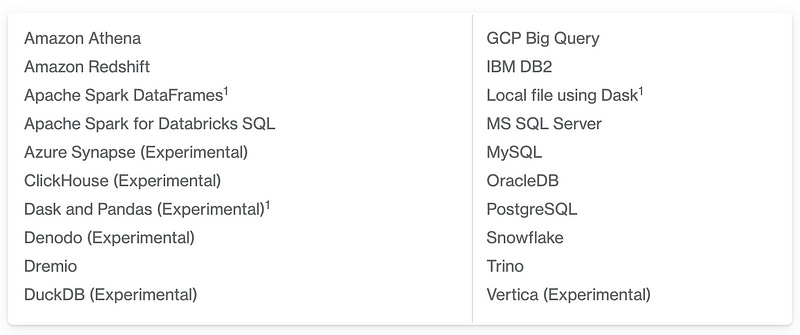
Data Sources
Use Soda Core to scan a variety of data sources;
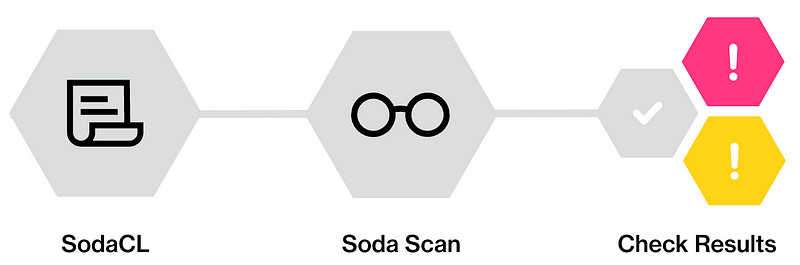
SodaCL
Soda Checks Language (SodaCL) is a YAML-based, domain-specific language for data reliability. Used in conjunction with Soda Core, Soda’s open-source, command-line tool, you use SodaCL to write checks for data quality, then use Soda Core to scan the data in your data source and execute those checks.
Soda Check
A Soda Check is a test Soda Core performs when it scans a dataset in your data source. When you use Soda Core to run a scan on data in your source, you reference both the configuration and check YAML files in the scan command.
Soda Scan
A Soda scan executes the checks you defined in the checks YAML file and returns a result for each check: pass, fail, or error. (Optionally, you can configure a check to warn instead of fail by setting an alert configuration.)
End-to-End Data Reliability Project with Soda Core
Database and Soda Core Configurations
In this project, I will use my local Postgres database as the main data source to connect and scan. In order for Soda Core to connect to the Postgres database, I have to install the related Python package.
pip install soda-core-postgresIf you don’t have a Postgres database on your local machine, you can install it from this link. Also for the sample database, I will use the DVD rental database. The sample database has the tables below;
There are 15 tables in the DVD Rental database:
actor — stores actors' data including first name and last name.
film — stores film data such as title, release year, length, rating, etc.
film_actor — stores the relationships between films and actors.
category — stores film’s categories data.
film_category- stores the relationships between films and categories.
store — contains the store data including manager staff and address.
inventory — stores inventory data.
rental — stores rental data.
payment — stores customer’s payments.
staff — stores staff data.
customer — stores customer data.
address — stores address data for staff and customers
city — stores city names.
country — stores country names.
After I install Postgres, build the DVD rental database, and install the Soda Core, I have to establish the connection between the Soda Core and Postgres. In order to do that, I have to fill in the relevant information in my configuration.yml file.
data_source dvdrental:
  type: postgres
  connection:
    host: localhost
    port: '5432'
    username: postgres
    password: ${POSTGRES_PASSWORD}
  database: dvd-rental
  schema: public
We are ready to write our checks and run the scans!
Example 1: Checking Soda Core configurations
As I mentioned before, Soda Core is a command line tool. It requires the configuration.yml to connect to the related data source and checks.yml to evaluate the given checks.
The code below is going to run a scan of the DVD rental data source by applying the relative configuration.yml and checks.yml files. In the beginning, I will keep my checks.yml file empty to see the output.
soda scan -d dvdrental -c configuration.yml checks.yml 
As we see above, the scan ran successfully without any checks applied which is expected. With this, we ensure that our Soda Core works correctly for the given configurations.
Example 2: Table emptiness check
In this example, we will add a check for our “actor” table to evaluate its emptiness. In order to add the checks, we need to start editing our checks.yml file. Below we write our first check SodaCL;
checks for actor:
  - row_count > 0
As we have added a check statement to the file, we need to pass a parameter to the scan command to read the checks.yml file. At our terminal, we execute the command below to apply the checks;
soda scan -d dvdrental -c configuration.yml checks.yml
As seen above, our check has passed successfully. But how Soda converted the check statement written in SodaCL? If we want to see the SQL query generated by Soda, we need to add the “-V” parameter to our scan.
soda scan -d dvdrental -c configuration.yml -V checks.yml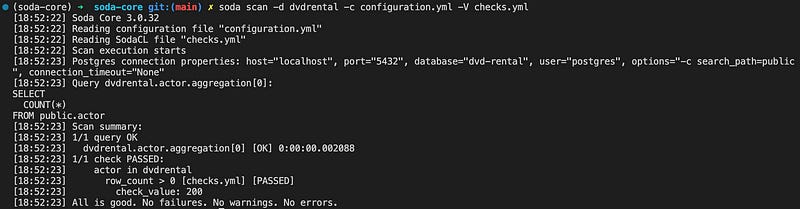
As seen above, we can see our Postgres connection parameters and the SQL query generated by Soda.
Example 3: Column-wise checks
At Soda, we can define column-wise checks in the checks.yml file. These checks can contain different scenarios. Below I am going to create various checks to control column-wise missing rows, duplicate rows, max amount, and schema checks.
# Checks for basic validations
checks for payment:
  # table empytiness check
  - row_count > 0

  # missing row check on the primary and foreign key columns

  - missing_count(payment_id) = 0
  - missing_count(customer_id) = 0
  - missing_count(staff_id) = 0
  - missing_count(rental_id) = 0

  # duplicate row check on the primary key column
  - duplicate_count(payment_id) = 0

  # max amount check
  - max(amount) < 12

  - schema:
      name: Confirm that required columns are present
      fail:
        when required column missing:
          [payment_id, customer_id, staff_id, rental_id]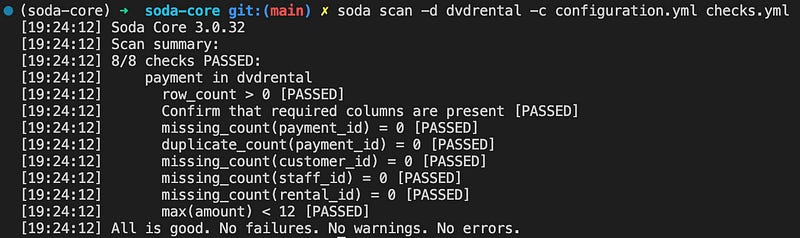
Example 4: Reference checks
Soda can use reference checks to validate that column contents match between datasets in the same data source. Also with that, I am going to demonstrate that in the same check.yml file, we can check multiple tables at once.
# Checks for basic validations
checks for customer:
  # table empytiness check
  - row_count > 0

checks for payment:
  # all customers in the payment table should exist in the customer table
  - values in (customer_id) must exist in customer (customer_id)
Example 5: Cross checks
At Soda, we can use cross-checks to compare row counts between datasets within the same, or different, data sources. This capability is handy when we want to check that the ETL pipelines don’t accidentally delete rows in our tables.
# Checks for basic validations
checks for payment:
  # Check row count between datasets in different data sources
  - row_count same as payment_raw
Example 6: Freshness checks
Soda supports various freshness checks on the time columns. Below I am going to check whether the payment_date column was updated no more than one day ago. This check will fail because the DVD Rental database is not updated since 2007.
# freshness check
checks for payment:
  # checking whether the payment_date is not older than 1 day
  - freshness(payment_date) < 1d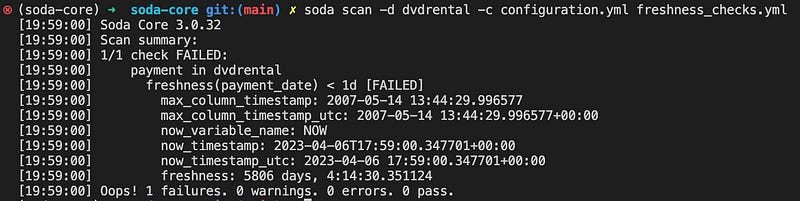
Example 7: User-defined checks
Soda allows us to define checks on whatever logic suits our requirements. In these checks either we can use capabilities assisted by Soda or we can even write SQL queries to define our requirements. Below I will create an average amount for a defined date range to demonstrate the average amount to be used as a check;
# Checks for user-defined checks
checks for payment:
  - avg_amount >= 10:
      avg_amount query: |
        select avg(amount)
        from payment
        where cast(payment_date as date) between '2007-02-15' and '2007-02-18'
Example 8: Check multiple times at the same time
With Soda, we can define multiple tables in the configuration file and check them together. In order to define multiple tables, we need to use the “for each dataset T” command as below;
for each dataset T:
  datasets:
    - payment
    - rental
    - store
  checks:
    - row_count > 0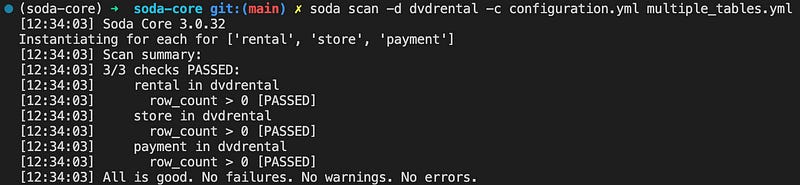
Example 9: Programmatic scan with Python
Up to now, we used CLI to run checks manually at our terminal. In a real-life use case, it is quite impossible to run checks manually over the terminal every single time. In this regard, we need to run our checks programmatically with Python.
The Soda Python library supports programmatic checks and we don’t need to use CLI all the time. Below I created a Python script to read the configuration and check files and execute them. In order to get an error I will use the freshness.yml file;
from soda.scan import Scan # importing the Soda library

scan = Scan() # loading the function
scan.set_data_source_name("dvdrental") # initialising the datasource name

# Loading the configuration file
scan.add_configuration_yaml_file(
    file_path="~/configuration.yml"
)
# Adding scan date variable to label the scan date
scan.add_variables({"date": "2023-04-11"})

# Loading the check yaml file
scan.add_sodacl_yaml_file("freshness_checks.yml")

# Executing the scan
scan.execute()

# Setting logs to verbose mode
scan.set_verbose(True)

# Inspect the scan result
scan.get_scan_results()
Conclusion
The simplicity of Soda Core is amazing! The tool supports almost plain English-like commands to write data validation steps. Support of the dedicated Python library, integration with the orchestration tools, and data source connections to over the ten most common data sources make it one of the best solutions in the open-source data reliability solutions.
Thanks a lot for reading 🙏
If you want to get in touch, you can find me on Linkedin and Mentoring Club!